React is a javascript library used by many to build user interfaces. Let’s understand the inner workings of react.
Document Object Model(DOM)
The DOM is a representation of the HTML structure that allows JavaScript to interact and manipulate the elements of a webpage
- HTML element is a node
- Parent-Child relationship based on their nesting.
<html>
	<head>
		<title>This is title</title>
	</head>
	<body>
		<h1>This is a header</h1>
		<p> This is a paragraph</p>
	</body>
</html>
Corresponding DOM Tree
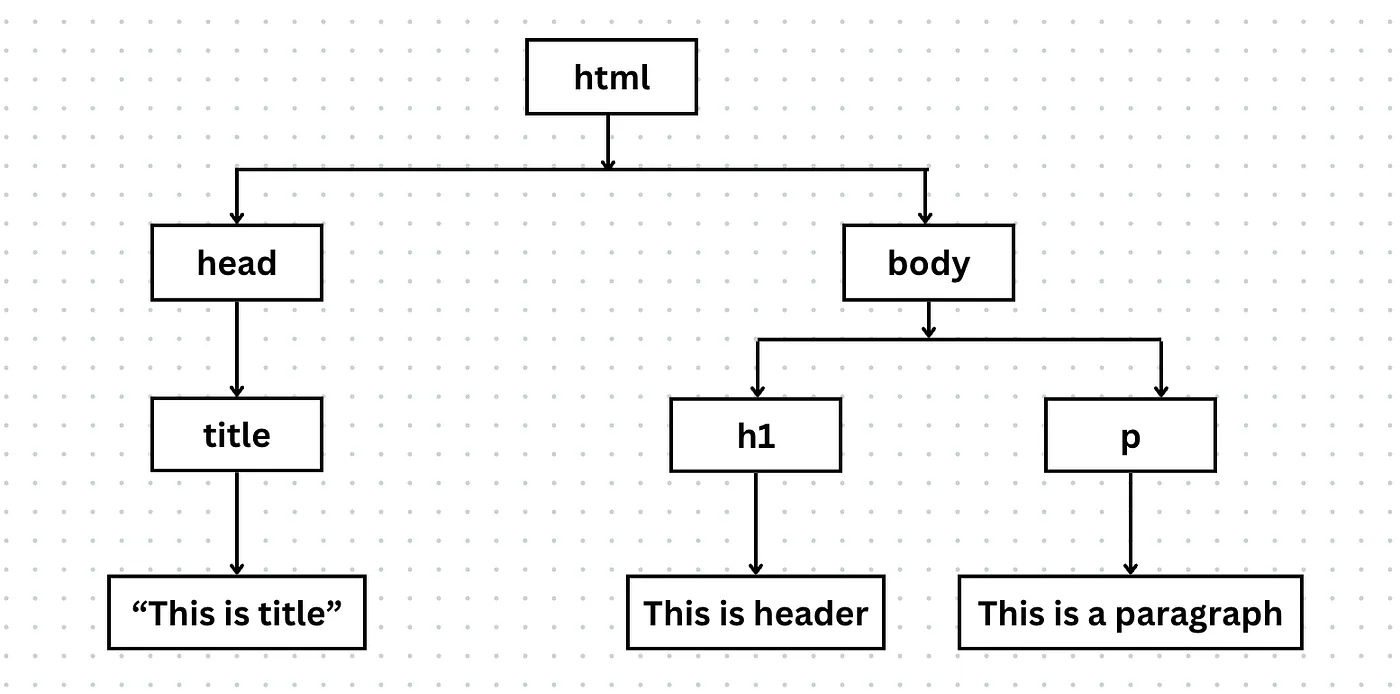 Pros:
Pros:
- easy identification and positioning of elements within the browser’s display Cons:
- after a change is made to a DOM element, the browser has to:
- recalculate the element’s size and position
- repaint the screen
Virtual DOM
JavaScript object representation of the actual DOM. i.e.
const domTree = {
	tagName: 'html',
	attributes: {},
	children: [
		{
			tagName: 'head',
			attributes: {},
			children: [
				{
				tagName: 'title',
				attributes: {},
				children: ['Href Attribute Example'],
				},
			]
		},
		{
			tagName: 'body',
			attributes: {},
			children: [
				{
				tagName: 'h1',
				attributes: {},
				children: ['This is a header'],
				},
				{
				tagName: 'p',
				attributes: {},
				children: ['This is a paragraph'],
				},
			]
		},
	]
}
With the help of React.createElement, react creates the javascript object of the HTML (as shown above), also known as JSX.
Pros:
- updating a virtual DOM is much faster and efficient than the actual DOM
- It does not require heavy web browser processing
- It involves updating the javascript object directly
- This process is streamlined with Reconciliation
Reconciliation
Key feature of react that efficiently updates the DOM by only making necessary changes.
- React creates a virtual DOM (lightweight copy of the real DOM)
- Change in component → new virtual DOM created
- Diffing algo
- traverses the tree
- compare changes between new and old virtual DOM
- Determine which component needs to be re-rendered on the real DOM
- Changes are made to the real DOM
Pros:
- ensures that minimum changes are being made on the real DOM
Diffing Algorithm
Is the heart of the reconciliation process which contributes to the efficiency and speed
Elements of Different Types
// Original DOM
<div>
	<Counter/>
</div>

// Updated DOM
<span>
	<Counter/>
</span> - Rebuilds the DOM
- Assumes that when the root element’s type changes, the entire subtree has been replaced and would need a complete rebuild
DOM Elements of the same type
// Original DOM
<div className="before" title="stuff" />

// Updated DOM
<div className="after" title="stuff"/>- no rebuild
- update the className attribute on the existing DOM element
Component Elements of the Same Type
<Counter count={0}>
	<button onClick={() => setCount(count + 1)}>+</button>
	<button onClick={() => setCount(count - 1)}>-</button>
	<span>{count}</span>
</Counter>- when increment/ decrement button is pressed,
- will not recreate new DOM element
- update the state of existing component
Children of DOM Element
// Original DOM:
<ul>
	<li key="first">first</li>
	<li key="second">second</li>
</ul>

// Updated DOM:
<ul>
	<li key="zero" >zero</li>
	<li key="first">first</li>
	<li key="second">second</li>
</ul>- diffing algo compare the keys between original DOM
- selectively update only those elements whose keys have been modified
- without the keys, the whole DOM would have to be updated
- This is the reason we see a warning to provide keys to list items that react throws